
1 line
2.0 KiB
XML
1 line
2.0 KiB
XML

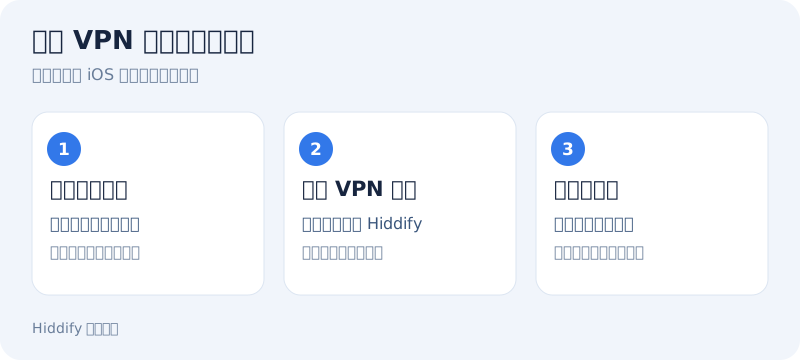


<svg xmlns="http://www.w3.org/2000/svg" width="800" height="360" viewBox="0 0 800 360" role="img" aria-label="允许 VPN 配置,开始连接"><rect width="800" height="360" rx="20" fill="#f1f5fb"/><g font-family="sans-serif"><text x="32" y="49" fill="#17253f" font-size="26" font-weight="700">允许 VPN 配置,开始连接</text><text x="32" y="80" fill="#697d99" font-size="16">首次使用按 iOS 系统提示完成授权</text><rect x="32" y="112" width="232" height="183" rx="16" fill="white" stroke="#dce5f1"/><circle cx="64" cy="149" r="17" fill="#3278e9"/><text x="64" y="155" text-anchor="middle" fill="white" font-size="17" font-weight="700">1</text><text x="50" y="196" fill="#17253f" font-size="21" font-weight="700">选中网站配置</text><text x="50" y="229" fill="#3a567c" font-size="16">打开首页的连接按钮</text><text x="50" y="257" fill="#697d99" font-size="15">确认使用刚导入的订阅</text><rect x="284" y="112" width="232" height="183" rx="16" fill="white" stroke="#dce5f1"/><circle cx="316" cy="149" r="17" fill="#3278e9"/><text x="316" y="155" text-anchor="middle" fill="white" font-size="17" font-weight="700">2</text><text x="302" y="196" fill="#17253f" font-size="21" font-weight="700">允许 VPN 配置</text><text x="302" y="229" fill="#3a567c" font-size="16">确认请求来自 Hiddify</text><text x="302" y="257" fill="#697d99" font-size="15">按系统提示验证身份</text><rect x="536" y="112" width="232" height="183" rx="16" fill="white" stroke="#dce5f1"/><circle cx="568" cy="149" r="17" fill="#3278e9"/><text x="568" y="155" text-anchor="middle" fill="white" font-size="17" font-weight="700">3</text><text x="554" y="196" fill="#17253f" font-size="21" font-weight="700">确认已连接</text><text x="554" y="229" fill="#3a567c" font-size="16">等待连接状态更新</text><text x="554" y="257" fill="#697d99" font-size="15">访问网站检验实际连接</text><text x="32" y="333" fill="#697d99" font-size="14">Hiddify 操作示意</text></g></svg> |